

A GPU cloud for inference should not be chosen only by GPU-hour price, card name, or VRAM capacity. An instance may run an LLM successfully in a test and look inexpensive in the pricing table, but in production it can still produce high p95 latency, a delayed first token, and expensive responses because of queues, cold starts, low utilization, and unsuitable batching.
The right choice starts not with the pricing page, but with the workload profile: which model is being served, how many input tokens each request contains, what response length is expected, how many concurrent requests the service must handle, and what latency is acceptable for users.
A short selection logic looks like this:
- Describe the inference workload profile: chat, RAG, batch generation, or an API with traffic peaks;
- Define latency requirements: TTFT, p95/p99, and full response time;
- Calculate VRAM requirements based on model weights, context length, batch size, KV cache, and runtime overhead;
- Choose a GPU instance class that matches the model and the real request pattern;
- Check cold start, scaling behavior, and the availability of warm capacity;
- Calculate the cost per 1 million tokens, not just the GPU-hour price;
- Run a load test using real prompts and typical LLM service failure scenarios.
The main criterion is simple: the model must not only fit into GPU memory, but also serve the target inference profile consistently in terms of latency, throughput, and token cost. If this is not verified in advance, a cheap instance can easily turn into an expensive service with poor user experience.
Why You Should Not Choose a GPU Cloud by Card Name Alone

A team may choose a GPU instance that looks good on the pricing page: the card is familiar, there is enough VRAM, and test generation starts successfully. In the demo, everything works: the model responds, tokens are generated, and there are no errors.
The problem begins under real load. In a chat service, users may wait too long for the first token. In a RAG scenario, long prompts increase prefill time and expand the KV cache. During traffic peaks, requests sit in a queue, cold starts of new replicas break p95 latency, and low utilization makes every million tokens more expensive than expected.
That is why this article is not about ranking cloud providers or training models. Training and fine-tuning are outside the scope. The focus is specifically on inference: how to choose a GPU cloud for an already selected model, a real request profile, and clear latency and cost requirements.
Below, we will go through the selection process step by step: first, the inference workload profile; then latency and batching; after that, VRAM, GPU class, cold start, scaling, and the cost per 1 million tokens. This order protects against the main mistake: looking at the price list before the workload itself is understood.
Start by Defining the Inference Workload Profile

The first step is not choosing a GPU, but describing the workload in measurable terms. You need to understand which model is being served, how often requests arrive, how long the input context is, how many output tokens are expected, what latency is acceptable, and how traffic changes throughout the day.
The same GPU instance can pass a demo without issues and still fail in a real API — not because the card is “bad,” but because of long prompts, queues, traffic peaks, or overly aggressive batching.
It is better to separate typical scenarios from the start:
- Interactive chat. A fast first token, stable p95, and the absence of long queues are important. Batching is possible, but only with a short batch wait time.
- RAG service. Retrieved documents are added to the request, so the input context becomes longer, prefill becomes more expensive, and the KV cache grows faster.
- Batch generation. For example, mass generation of descriptions or classifications. The latency of a single job is less important than throughput and GPU utilization.
- API with traffic peaks. Limits, queues, warm capacity, or a clear fail-fast mode are needed. Otherwise, rare peaks will define p95/p99 and cost.
This profile immediately sets the framework for the next calculations: acceptable latency, VRAM headroom, batching aggressiveness, cold start requirements, and token economics. Without it, choosing a GPU cloud turns into guesswork based on the pricing table and the card name.
Latency: Which Delays to Measure and How Batching Affects Them

For inference, looking only at average response time is not enough. The average may look acceptable while a small share of slow requests still damages user experience and violates the SLA.
Several metrics matter in practice:
- TTFT — time to first token, especially important for chat and streaming responses;
- Prefill — processing the input prompt before generation starts; it becomes significantly more expensive with long context;
- TPOT — time per output token after generation has started;
- Tokens/sec — generation speed and the basis for throughput calculation;
- P95/p99 — tail latencies, where queues, traffic peaks, and cold starts become visible.
Batching controls the trade-off between latency and GPU utilization. A request may wait until a batch is formed, but a larger batch loads the GPU more efficiently and increases throughput. That is why batching should not be treated simply as an “acceleration” mechanism: it can reduce token cost while increasing TTFT and p95.

In practice, the batching mode should be selected based on the service type and acceptable latency:
| Batching Mode | Where It Fits | Main Trade-off |
| Minimal | Chat, latency-sensitive API | Lower TTFT and more stable p95, but higher token cost because of GPU idle time |
| Dynamic with short wait time | API with steady traffic | Better GPU utilization, but a moderate latency increase is possible |
| Aggressive | Background generation, batch jobs | High throughput, but poor p95 for interactive scenarios |
For chat, controlled TTFT and predictable p95 are more important. For background generation, GPU utilization and processing cost matter more. For RAG, prefill should be evaluated separately: long context can hurt latency even when generation speed itself looks normal.
The next constraint is VRAM. Increasing batch size, context length, and the number of concurrent requests directly increases active memory usage, so “the model loaded” does not yet mean the service can handle real production load.
VRAM: Why Memory Is Not Calculated Only by Model Weights

The check “the model loaded on the GPU” is not enough. It only proves that the service can start, not that the inference system will run reliably under real load.
Model weight is the first memory category, but not the only one. As a rough reference:
| Model Size | Precision | Memory for Weights Only |
| 7B/8B | FP16 | ~14–16 GB |
| 7B/8B | 4-bit | ~4–6 GB |
| 13B/14B | FP16 | ~26–30 GB |
| 13B/14B | 4-bit | ~7–10 GB |
| 70B | 4-bit | ~35–45 GB |
| 70B | FP16/BF16 | ~140 GB |
Quantization reduces memory used by weights, but it does not remove the other costs. In real inference, VRAM is consumed not only by the model itself, but also by active service operations:
- KV cache — grows with context length, batch size, and the number of concurrent requests;
- Runtime buffers — needed by the runtime, attention operations, and the serving framework;
- Memory fragmentation — reduces the usable VRAM headroom;
- Adapters and optimizations — may add their own overhead;
- Peak reserve — needed so the service does not fail under long prompts and traffic spikes.
A typical failure looks like this: a 7B model in 4-bit runs on a mid-range GPU, but in a RAG service, long prompts and several concurrent users quickly consume the available VRAM headroom. As a result, OOM errors, restarts, or p95 growth due to queuing appear.
That is why VRAM should not be filled “to zero.” The service needs headroom for the KV cache, peaks, fragmentation, and changes in the request profile. The next step is to match these calculations with a GPU instance class — while remembering that enough memory still does not guarantee acceptable latency.
How to Choose a GPU Instance for the Model Size
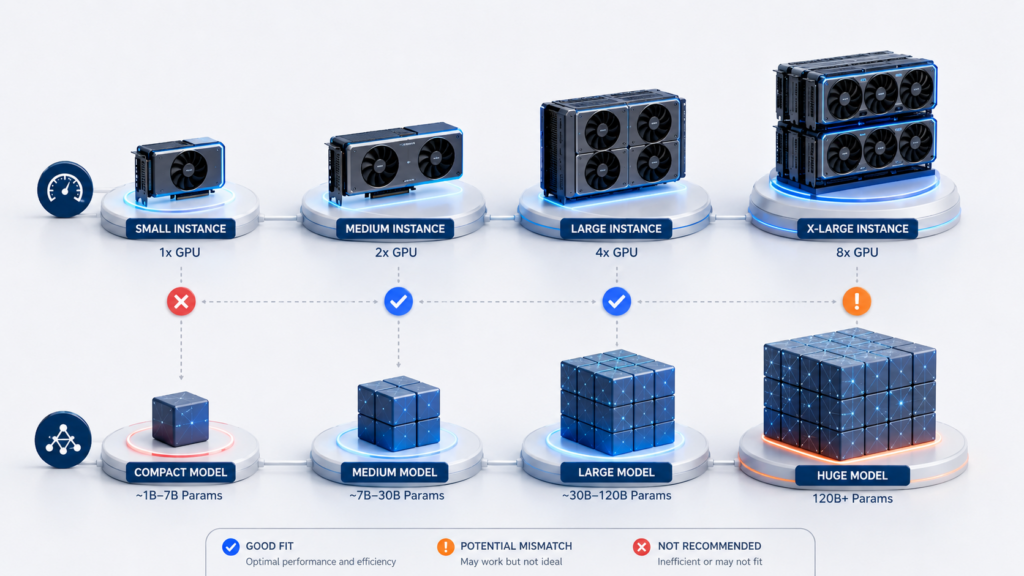
This is only a preliminary filter. An instance may fit the model and still fail to maintain acceptable p95 because of long context, limited memory bandwidth, queues, or the specifics of the inference stack.
The choice should be based not only on model size, but also on the serving scenario:
| Scenario | What Usually Fits | What to Check Before Choosing |
| 7B/8B for chat or a lightweight API | Mid-range GPU, sometimes L4-class | TTFT, p95, VRAM headroom for context and concurrent requests |
| 7B/8B in RAG | GPU with VRAM headroom beyond the model weights | Prompt length, prefill, KV cache growth, and context limits |
| 13B/14B | L40S-class or similar memory headroom | Tail latencies, batching, stability under load |
| 30B/34B in 4-bit | L40S/A100-class | Memory bandwidth, p95, and cost per 1 million tokens |
| 70B in 4-bit | A100/H100-class | Context length, parallelism, p95, and token economics |
| 70B in FP16/BF16 | Multiple GPUs | Inter-GPU communication, latency, cost, and operational complexity |
The main point is that 70B in 4-bit and 70B in FP16/BF16 are different engineering tasks. In the second case, splitting the model across multiple GPUs is almost unavoidable, and latency depends not only on the GPU itself, but also on communication inside the node.
External benchmarks are useful as a reference, but the final decision should be made through a load test on your own request mix: with realistic prompt lengths, response limits, concurrency, and target p95/TTFT.
Cold Start and Scaling

After choosing a GPU class, it is important to test not only the speed of an already running replica, but also how the service behaves during scaling. For inference, what matters is not the abstract “availability of an instance,” but the moment when the service is actually ready to generate a response.
Cold start is the delay between a request arriving and the service being ready to produce the first token. In a GPU cloud, this may include starting a virtual machine or container, loading model weights, initializing the runtime, warming up GPU operations, and filling internal caches. For the user, it looks simple: the first token arrives too late, or the request times out.

Cold start is especially important in three cases: when scale-to-zero is used, when requests are rare but latency-sensitive, or when peak load starts new replicas only after the queue has already begun to grow.
It is worth checking not only whether autoscaling exists, but the full startup chain:
- Time from replica startup to the first successful request;
- Model loading speed into VRAM;
- Whether a warm-up test request is required;
- Queue behavior during scaling;
- Availability of the required GPUs in the selected region;
- Provider limits on the number of instances and provisioning speed.
For interactive chat and RAG, a warm minimum is usually needed: at least one ready replica with the model already loaded. For background generation, costs can be reduced more aggressively, and cold start can be included in the processing schedule. If the SLA requires stable interactive performance, the cost of warm capacity should be included in the inference calculation from the start, rather than treated as “unnecessary idle time.”
After that, it is time to move on to economics. A GPU cloud is chosen not only by latency, but also by how much each actually processed token costs at acceptable p95 and TTFT.
Inference Cost and the Cost per 1 Million Tokens

Inference cost should not be calculated only by GPU-hour price. A cheap instance may turn out to be expensive if it is poorly utilized, often idle, generates tokens slowly, or requires extra replicas to maintain p95 latency.
A more practical approach is to calculate the effective token cost: how many paid resources are spent on actually processed input and output tokens while staying within acceptable p95/TTFT limits.
The basic formula for estimating the cost per 1 million tokens is: Cost_1M = ((P_gpu + P_aux) × 1,000,000) / (TPS_load × U × 3600)
Where:
- Cost_1M — cost per 1 million processed tokens;
- P_gpu — GPU instance price per hour;
- P_aux — auxiliary hourly costs: CPU, RAM, disks, network, load balancer, logging;
- TPS_load — measured token processing speed under load, in tokens per second, while staying within acceptable p95/TTFT;
- U — share of paid time during which the instance is doing useful work;
- 3600 — number of seconds in an hour.
This formula is useful when comparing options: for example, when deciding whether a cheaper instance with low utilization is better than a more expensive GPU that can sustain both throughput and latency.
If the service is already running, it is easier to calculate the actual cost over a period: Cost_1M = TotalCost / (TotalTokens / 1,000,000)
Where TotalCost includes all expenses for the period, and TotalTokens is the sum of input and output tokens.
For RAG, input tokens cannot be ignored. Long context increases prefill, expands the KV cache, and can make a request expensive even before response generation begins.
Here is an example with illustrative numbers: a GPU instance costs $3 per hour, and auxiliary costs are $0.30 per hour. Under target load, the service processes 120 tokens/sec, while useful utilization of paid time is 60%.
Cost_1M = ((3 + 0.3) × 1,000,000) / (120 × 0.6 × 3600) ≈ $12.7 per 1 million tokens
If dynamic batching increases throughput to 180 tokens/sec while TTFT and p95 remain within the SLA, token cost decreases. But if p95 exceeds the acceptable threshold, the savings are not valid: the service became cheaper only by worsening latency.
The cost of a single request can be estimated as: Cost_request = Cost_1M × Tokens_request / 1,000,000
Where Tokens_request is the average or p95 value of the total input and output tokens per request.
Cost should be calculated not as “how much the GPU costs,” but as “how much a stable response costs at the required latency.” A cheap token only makes sense when the service meets target TTFT, p95, and p99.
After calculating the economics, it is still necessary to check whether the chosen setup breaks under typical inference service failures. A low Cost_1M will not help if p95 exceeds the SLA, the model fails with OOM errors, the first token arrives too late, or batching turns chat into a queue. That is why, before making the final GPU cloud choice, it is worth going through a short list of common failure modes.

Common Mistakes When Launching LLM Services

Mistakes when launching LLM services are more often caused by an incomplete inference workload assessment than by a “bad GPU.” The model may start, the demo may work, but in the real API, OOM errors, queues, high p95 latency, expensive tokens, or long cold starts may appear.
Before choosing or changing a GPU cloud, it is worth checking the most common problems:
| Mistake | What to Check |
| The instance was selected only by GPU-hour price | Calculate Cost_1M using actual tokens, utilization, and acceptable p95/TTFT |
| Only model loading into VRAM was tested | Test real prompts, context length, KV cache, and concurrent requests |
| Aggressive batching was enabled for chat | Limit batch wait time and check TTFT/p95 under interactive load |
| Scale-to-zero is used for an API with SLA | Keep a warm minimum or measure cold start to first token in advance |
| The benchmark was run on short prompts | Test the real request length distribution, especially for RAG |
| There are no limits on context and response length | Introduce token limits, rejection rules, and backpressure |
| The model was split across several GPUs without testing | Check inter-GPU latency, p95/TTFT, and cost on the target setup |
| OOM and overload are not handled | Configure VRAM monitoring, queues, graceful degradation, and restart rules |
This check should be done before choosing the final instance. If the service only passes a short synthetic test, but has not been tested on real prompts, concurrency, batching, cold start, and context limits, the production result will almost certainly be different.
Conclusion

A GPU cloud for inference should not be chosen by card name or GPU-hour price, but by how the service handles real load: the model, context, VRAM, batching, cold start, p95/TTFT, and token cost.
Tables help filter out unsuitable instances, but the final decision should be confirmed by a load test using real prompts, response lengths, and concurrent requests.
A reliable choice is not “the model fits into VRAM.” It is “the service consistently responds within the required latency and delivers an acceptable cost per 1 million tokens.”
FAQ
Can a GPU cloud be chosen only by VRAM capacity?
No. VRAM shows whether the model weights and working memory can fit, but it does not guarantee acceptable p95, TTFT, throughput, or token cost. The model should be tested with realistic prompt lengths, batch size, concurrent requests, and target latency requirements.
What matters more for a chat service: throughput or TTFT?
For interactive chat, TTFT and stable p95 are usually more important. Users notice a delayed first token and long tail latencies faster than abstract throughput. Throughput matters, but it should not be achieved at the cost of queues and poor user experience.
Why can a RAG service be more expensive than regular chat?
RAG adds retrieved documents to the request, which increases the input context. This increases prefill, VRAM usage for the KV cache, and the total number of input tokens. For RAG, it is therefore necessary to calculate not only output tokens, but also the long context processed before response generation begins.
When can scale-to-zero be used?
Scale-to-zero is suitable for background jobs, rare non-urgent requests, or batch generation where cold start can be included in the processing schedule. For an API with an SLA, interactive chat, and latency-sensitive RAG, a warm minimum is usually needed: at least one replica with the model already loaded.
Why can a cheap GPU-hour lead to an expensive token?
Because the final cost depends on utilization, tokens/sec, auxiliary costs, idle time, batching, and latency requirements. If an instance is cheap but sits idle, handles load poorly, or requires extra replicas to maintain p95, the cost per 1 million tokens may be higher than with a more expensive but better-utilized option.


